
A high performance 4K UHD camera lets you make sharp and clear videos. The colors look bright and the details stand out. You can use this camera for many things. People in media production use it to show every detail in movies. Content creators and vloggers use it to make professional videos. Businesses and schools use these cameras for meetings and presentations. Security teams use them to watch over places. Drone pilots use them to take amazing pictures from the sky. When you pick a camera, look for the features you need most. Think about how simple it is to connect and use the camera with your equipment.
Key Takeaways
High performance 4K UHD cameras make videos look sharp and clear. The colors are bright and strong. These cameras are great for making media, creating content, and for security.
You should check for important features like 60fps recording. Bigger sensors help the camera see better. Advanced codecs make the video look good, even in low light.
Image stabilization is very important for smooth videos. Pick cameras that have built-in stabilization. This helps stop your videos from looking shaky when you move.
USB and HDMI connections are important for using other devices. These options make it easy to stream and record without problems.
When you pick a camera, think about what you need. You might need good low-light performance or a better lens. This will help you choose the right camera for your work.
What Is a High Performance 4K UHD Camera?

4K UHD Camera Basics
When you want a high performance 4K UHD camera, you want more than just clear pictures. These cameras use smart technology to give you great results. You get ultra high definition video with 4K resolution. This means 3840 x 2160 pixels. That is four times more detail than Full HD. You can see every small part, even when it is dark.
Here are some things that make high-end 4K cameras different from regular ones:
You can record at 60 frames per second or more. This makes your videos look very smooth and real.
Bigger sensors, like APS-C or full frame, help the camera get more light. This gives you better video, even in dark places.
Advanced codecs, like ProRes and XAVC, keep your videos clear and sharp, even with high bit rates.
Some cameras use H.265 compression. This helps you save space and use less data without losing quality.
Fast processors inside the camera help you get smooth 4K video every time.
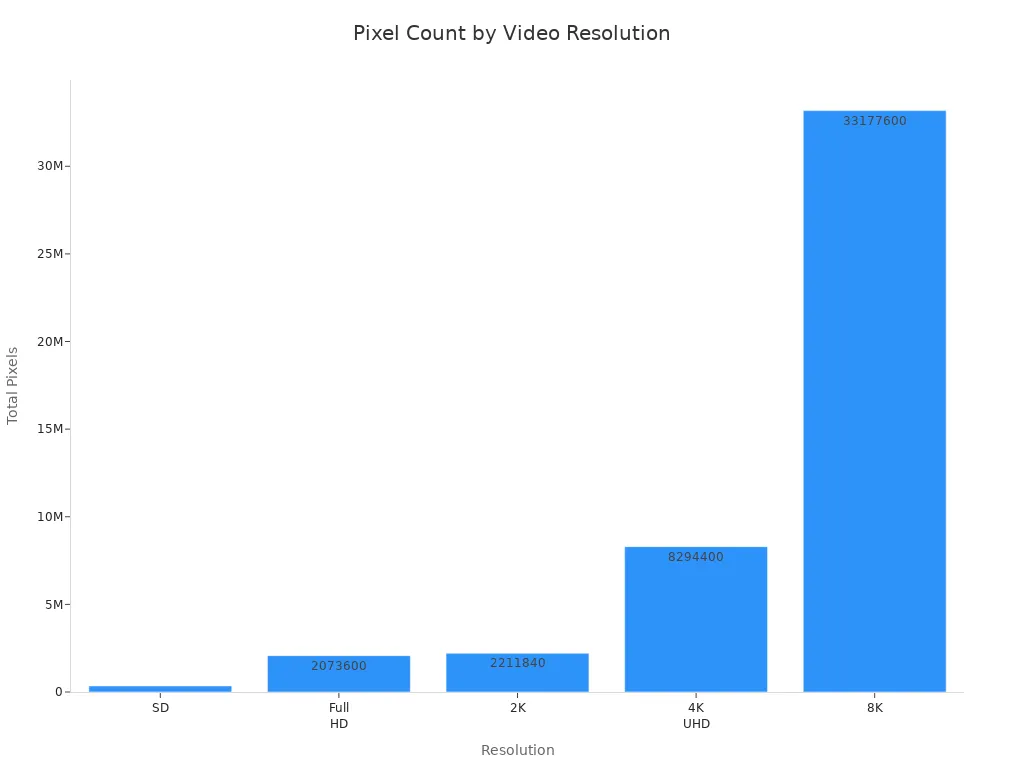
You can see how 4K UHD compares to other resolutions in this table:
Resolution | Pixel Count | Clarity Comparison |
|---|---|---|
4K UHD | 3840 x 2160 pixels | Four times the pixel count of Full HD (1080p) |
Full HD | 1920 x 1080 pixels | Lower clarity compared to 4K UHD |
2K | 2048 x 1080 pixels | Less detail than 4K UHD |
8K | 7680 x 4320 pixels | Higher than 4K UHD, but less common |
SD | 720 x 480 pixels | Significantly lower clarity than 4K UHD |
Benefits of 4K Video
There are many good things about using a 4K UHD camera. The extra detail and sharpness make your videos look special. You can crop or zoom in when you edit your video and still keep good quality. This gives you more ways to make your video look just right.
Here is a table that shows some main benefits:
Benefit | Description |
|---|---|
Enhanced Clarity and Finer Details | 4K resolution captures much more visual information than 1080p, so your images and videos are sharper. |
Flexibility in Post-Processing | 4K footage lets you crop and stabilize your video without losing sharpness, which helps with editing. |
Compatibility with High-End Devices | 4K TVs and monitors use 4K content to show amazing detail and make things look real. |
Better Downsampling | Shooting in 4K before making 1080p videos helps keep better quality and detail. |
You can use these cameras for many things, like streaming, teaching, or making movies. The quality from 4K cameras helps you make videos that look clear and professional. You will see the difference right away when you watch your videos on a big screen.
Key Features of High Performance 4K Cameras
Resolution and Frame Rate
You want your videos to look clear and smooth. The most important thing is the 4K resolution. This means you get very sharp images with 3840 x 2160 pixels. You can see every detail, even if you zoom in. If you use a 4K 60fps camera, your videos look natural and fluid. Higher frame rates like 60fps make sports and action scenes look smooth. Fast-moving footage has less blur and more sharpness. Some 4K cameras can record at 120fps for slow-motion. With 4K resolution, your images are sharper and easier to edit. You can crop or fix your video without losing quality. True 4K recording helps you capture every moment with great visuals.
Tip: For sports or fast action, pick a 4K camera that supports 60fps or more. Your videos will look exciting and professional.
Sensor Size and Low-Light
Sensor size is important for image quality. Bigger sensors, like the 1/1.8” IMX678, collect more light. This helps you get better videos in dark places. Large pixels show more detail in shadows. You see less noise and clearer images in dim rooms or at night. High dynamic range makes bright and dark parts look balanced. If you want good videos in any light, choose a 4K camera with a big sensor.
Image Stabilization
If you move the camera, your video can look shaky. Image stabilization helps fix this problem. Built-in stabilization keeps your videos smooth, even if your hands shake. Some 4K cameras use FlowState stabilization. This keeps your video steady in rough situations. You get professional results without extra gear. If you want to record while walking, pick a 4K camera with strong stabilization.
Built-in stabilization removes shaking from your videos.
FlowState stabilization keeps your video steady in tough spots.
Connectivity Options
You need simple ways to connect your camera to other devices. High performance 4K cameras give you many choices. The ELP-USB4KCAM678U3-V100 has USB 3.0 Type-C and HDMI outputs. USB lets you connect to your computer or laptop easily. HDMI connects straight to a TV or monitor for quick viewing. Some 4K cameras also support IP streaming for live broadcasts and remote control.
Purpose | |
|---|---|
HDMI | Connects to TV, switcher, or recorder |
USB 3.0 | Easy use for Zoom, Skype, or Teams |
IP (RTSP/RTMP/SRT/NDI) | For live streaming and remote control |
Note: Dual outputs let you watch and record at the same time. This is helpful for streaming, meetings, and teaching.
Lens Quality
Lens quality changes how your videos look. Good lenses, like the no-distortion lens on the ELP-USB4KCAM678U3-V100, give you sharp and true images. You see real colors and clear details. Good lenses stop blurring and color problems. Your video stays sharp from edge to edge. Bad lenses can make your video blurry or change colors. For the best 4K video, pick a camera with a high-quality lens.
Lens quality affects how sharp and focused your video is.
No-distortion lenses make images clearer and more accurate.
Good lenses reduce problems like vignetting and distortion.
You get the best results when you pick features that fit your needs. Whether you want 4K video for streaming, teaching, or checking things, these features help you get great videos every time.
Best 4K Cameras for Different Needs
Streaming and Conferencing
You want your video to look clear and smooth. A high performance 4k uhd camera like the ELP-USB4KCAM678U3-V100 gives sharp pictures and bright colors. This 4k 60fps camera connects fast to your computer or TV. You can use it right away with plug-and-play. Dual USB and HDMI outputs let you share video live. Many 4k cameras work well for events, webinars, and meetings. Faces and details look crisp with 4k resolution.
Tip: Pick a camera with high frame rates for smooth video when things move fast.
Professional 4K Recording
You need special features for professional 4k video. The table below shows what matters most:
Feature | Description |
|---|---|
Resolution | 4K resolution (3840 x 2160 pixels) makes videos clear and easy to edit. |
Low-light performance | Cameras like the Sony A7S III show bright colors in dark places. |
Dynamic range | High dynamic range shows more detail in light and dark spots. |
Autofocus features | Fast autofocus helps you catch action without missing anything. |
Image stabilization | Your video stays smooth even if you move the camera. |
Frame rates | 60fps or more keeps video sharp and smooth. |
Codec choices | MP4 and MOV formats change how you edit and save videos. |
These features help you get better video and more ways to edit. Many professionals use 4k ptz camera models for flexible angles and smooth zooms.
Education and Inspection
You can use 4k cameras in schools and labs. Teachers show papers and science projects with clear video. Students see every detail, which helps them learn. In factories, 4k USB cameras help workers check products. You can spot problems and keep quality high. The ELP-USB4KCAM678U3-V100 works well for teaching and checking. You get easy setup and sharp UHD video.
4k document cameras make lessons more fun.
4k ptz camera systems help you look at big areas or zoom in close.
USB cameras connect easily for quick recording.
How to Choose 4K Security Camera
You want the best 4k camera for watching your home or work. Use the table below to compare important things:
Criteria | Description |
|---|---|
Resolution | True 4K (3840x2160) gives clear video, even at night. |
Field of View (FOV) | Wide FOV covers more space; 90°–120° works well inside. |
Night Vision | IR range of 30 meters or more helps you see in the dark. |
Frame Rate | 25–30 fps keeps video smooth and easy to watch. |
Compression Technology | H.265 saves space without losing video quality. |
Storage Options | Pick local, cloud, or both for your 4k security camera system. |
Motion Detection Alerts | AI filtering stops false alarms and keeps watching accurate. |
Two-Way Audio | Talk through the camera to guests or warn people. |
Weather Resistance | IP66 or IP67 rating keeps outdoor cameras safe from rain. |
Smart Integrations | Connect with Alexa, Google Assistant, or Apple HomeKit for easy control. |
You see the power of 4k resolution in every video frame. Pick a camera that fits your needs and works with your devices. You get good recording and clear video for safety.
Note: Always check if the camera works with your system before buying. The best 4k camera for security fits your space and connects easily.
Comparing 4K Cameras
Matching Features to Your Needs
You want to choose the best high performance 4k uhd camera for your work. First, look at the most important things. Here is a list to help you compare 4k cameras:
Frame Rate: A 4k 60fps camera makes videos look smooth. This is great when things move quickly.
Lens Quality Optical Zoom: Good lenses and strong zoom help you see small details in your videos.
PTZ Capabilities: A 4k ptz camera lets you move and zoom the view. This helps with watching or recording.
Connectivity: USB, HDMI, and network ports make it easy to share videos and connect to other devices.
Low-Light Performance: Good sensors help you get clear videos even when it is dark.
Sensor size changes how your videos look. Bigger sensors take in more light, so your videos stay bright and clear. Image stabilization keeps your videos steady, even if your hands shake. You need good connections to move videos fast and use other devices.
Tip: Pick camera features that match what you need. For streaming, get a camera with a fast frame rate. For watching places, pick a 4k security camera system with PTZ and night vision.
Budget and Value
You want to get the most for your money. Some 4k cameras cost more because they have extra things. If you need a camera for home watching, look for simple models like Uniview. These cameras are not too expensive and work well. For big rooms or pro recording, you may need special things like AI object recognition or PTZ. Always check if the camera fits your budget and has what you need.
Camera Type | Best For | Value Point |
|---|---|---|
Basic 4k Cameras | Home, small office | Affordable, easy to use |
PTZ Cameras | Large areas, events | Flexible, remote control |
AI Cameras | Security, research | Smart alerts, real-time info |
User Reviews and Expert Insights
You can learn a lot from user reviews and expert advice. People talk about how their 4k cameras work for streaming, watching, or recording. Experts test cameras and compare video quality, sensor size, and connections. You should read reviews to see if the camera works with your gear. Some people like the best 4k camera for watching because it gives clear video day and night. Others like cameras with live audio for real-time checking. AI features help you get alerts when something happens in your video.
Note: Always read reviews before you buy. You want a camera that fits your needs and works with your stuff. If you want to know how to choose 4k security camera, look for feedback on how easy it is to use and how well it works.
4K Video and Recording Essentials

Bit Rate and Image Quality
When you use a high performance 4k uhd camera, you want your videos to look sharp and clear. Bit rate plays a big role in this. Bit rate means how much data your camera uses for each second of video. If you choose a higher bit rate, your video will show more detail and fewer blurry spots. Most 4K video recording happens at bit rates between 50 and 100 Mbit/s. This is much higher than 1080p, which usually uses 10 to 30 Mbit/s. You get better image quality with fewer compression artifacts when you use a higher bit rate.
Higher bit rates help your 4k ptz camera capture smooth and vivid colors.
Bit rate affects both the quality and the size of your video files.
For the best results, aim for 100 Mbps or more when recording in 4K.
Tip: If you want to see every detail, use a 4k 60fps camera with a high bit rate. Your videos will look crisp even on big screens.
Storage and Power Management
You need to think about storage and power when you use a 4k ptz camera for recording. Large video files need plenty of space. Choose fast SD cards or SSDs that can handle high-speed writing. Plan your storage so you do not run out during important moments.
Power management keeps your camera running smoothly. Here are some best practices:
Use separate power supplies for each camera, especially if you have many cameras. This helps prevent overloads and keeps voltage steady.
Set up a centralized power box if you use several cameras. This makes it easier to organize and avoid power problems.
Think about future needs. Pick a power supply that can support more cameras if you plan to expand.
Storage Option | Speed | Best Use Case |
|---|---|---|
SD Card | Medium | Short recordings |
SSD | Fast | Long sessions |
Cloud Storage | Variable | Remote access |
Note: Always check your storage and power before you start recording. This helps you avoid interruptions and keeps your videos safe.
You can find the best high performance 4k uhd camera by using easy steps. First, look at the sensor technology and lens quality. These help you get sharp pictures. Next, check if the camera has good data ports and image processing. Make sure it has enough power and ways to save your videos. Then, compare different cameras by testing them and reading what users say. Think about the price, if it works with your system, and if you can get help later.
Tip: Pick camera features that fit what you need and make sure it connects to your devices.
FAQ
What does 4K UHD mean?
4K UHD means your camera records video at 3840 x 2160 pixels. You see more detail and sharper images compared to regular HD cameras.
Can I use a 4K camera for live streaming?
Yes, you can use a 4K camera for live streaming. Many models, like the ELP-USB4KCAM678U3-V100, offer plug-and-play USB and HDMI connections for easy setup.
Do I need special software to use a 4K USB camera?
You do not need special software for most 4K USB cameras. Plug the camera into your computer, and it works with popular apps like Zoom, Teams, or OBS.
How much storage does 4K video require?
4K video files are large. For one hour of 4K at 60fps, you may need 40–100 GB of space. Use fast SD cards or SSDs for best results.